Homes & households
Connect adult household members to their home. Review invitations, request to join a home and give someone temporary access when needed.
Manage visitors, households and everyday society work. All in one place.




Manage the people, arrivals and records that keep your society running, from each household to the entrance.
Connect adult household members to their home. Review invitations, request to join a home and give someone temporary access when needed.
Plan a visit, share a QR pass through WhatsApp and organise a gathering with a guest limit. Guests can use their pass without installing an app.
Set dates, days and arrival times for a housekeeper, tutor, caregiver or frequent visitor. Pause access or end it when plans change.
Respond to an arrival or allow an eligible parcel to be received at the gate. Keep track of packages waiting for collection and their handover.
Organise blocks, flats, owners and current residents. Set up gates, assign security staff and keep household contacts easy to find.
Look up visits by household and review recorded arrivals and departures. Keep approvals, actual entry and exit clearly distinguished.
The details change from one day to the next. Here is how KnockInn helps you handle them.
Add a guest, the number of people and the visit window, then share the invitation link or QR pass. Security checks the pass when they arrive.
For a gathering, set a guest limit and share one registration link. Guests receive their own passes. Change or cancel an invitation when your plans change.
Choose the days, arrival window and end date for a housekeeper, driver, tutor or other regular visitor. Share the pass once for that schedule.
Pause it during a break, replace the schedule when timings change, or end it. Entry is still checked and recorded at the gate.
Where your society offers parcel receipt, give permission for security to receive an eligible package and see which parcels are waiting for you.
The collection is recorded when it is handed over. Leaving a package at the gate does not give the delivery person permission to enter.
The primary resident can invite another adult by phone or email. The person signs in with that contact and accepts the invitation to use the shared household features.
A resident without an invitation can request to join their home. The society reviews the request. Once it is approved, you accept the invitation to your home.
Give a trusted person temporary access for set dates. Choose whether they can respond to new gate requests, invite their own guests, or both.
They accept the invitation, and access ends on the date you set or when you revoke it. They do not become a permanent household member or receive earlier visitor history.
Review the visitor request and decide whether to allow the visit. A decision is kept separate from the guard recording the actual arrival.
If the society enables phone decisions, security can contact a registered household approver and record their response. An unanswered call is not an approval.
Your requests, upcoming visits and household tools in one place.
 KnockInnHome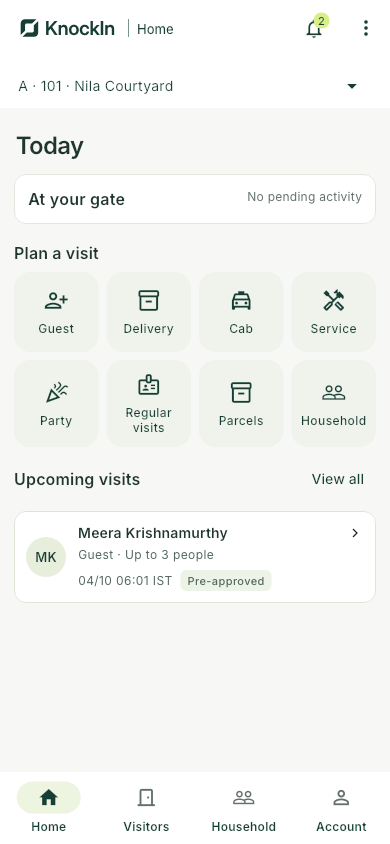
Build a clear picture of your property and the people who live and work there. Keep the everyday information your society needs in a shared workspace.
See it in a demoSet up blocks and flats, import a clean list of records and connect people to the right homes. Keep ownership, current occupancy and contact information separate and clear.
Add gates, assign security staff and review entry procedures. Choose optional features such as regular visitor schedules, party invitations and parcel receipt to suit your society.
Use one account to manage multiple societies. Switch between them while each society keeps its own households, teams, settings and records.
An owner who lives elsewhere does not automatically see their tenant’s visitors. Household access follows the people who currently live in the home.
We help your society get set up and show people how to use it. Start with your existing phones and an internet connection.
Prepare your blocks, flats, household contacts and gates. We guide the setup and one clean template import.
Invite residents to their homes and assign your security team. Two remote training sessions are included.
Check your entry procedures, walk through an invitation and arrival, and start using KnockInn with routine support.
One straightforward plan for your society. No separate per-person software fees.
Minimum society subscription ₹999/month
Applicable GST extra. No module or per-gate software licence fees.
The higher of ₹999 or ₹20 × the agreed flat count. Monthly billing in advance. Cancel before the next billing cycle.
Book a demoHardware, connectivity, on-site work and custom migration or integrations are outside the subscription. Payment-processing and paid messaging or voice charges, if used, are disclosed separately.
See how KnockInn fits your society. Book a walkthrough with our team.
Pilot scope and costs are agreed before activation.
hello@nelfet.comKnockInn helps apartment communities bring everyday society management together, from households and society administration to visitors and regular help.
Book a demo to discuss your society. We agree the scope and cost, help with setup and guide your community through getting started.
Yes. KnockInn is built for apartment communities, including small buildings. Plans start at the society minimum of ₹999 per month, plus applicable GST.
A walkthrough of the tools your society can use, how setup works and what is included in the subscription. We will confirm the scope before you commit.
The primary resident can invite another adult by phone or email. After accepting the invitation, they can use the shared household features. A resident who has not been invited can request to join their home for society review.
Residents can use the Android app or a web browser. Society administration works in a browser, and security uses the gate app. We will help you check device and internet requirements during setup.
Owning the flat does not automatically give access to the current household’s visitors. An owner who lives in the home can have resident access; an owner who lives elsewhere has a separate property view.
Your society can enable optional features such as regular visitor schedules, party invitations, parcel receipt and recorded phone decisions. Setup includes reviewing how these fit your entry procedures.
No. Share a visitor pass with your guest, including through WhatsApp, for them to present at the entrance.
The monthly subscription is the higher of ₹999 or ₹20 multiplied by your agreed flat count, plus applicable GST. For example, 50 flats cost ₹1,000 per month and 100 flats cost ₹2,000. Use the calculator above for your society.
The agreed product scope, standard remote setup, one clean import, two remote training sessions and routine support are included. There are no per-person or per-gate software fees. Hardware, connectivity, on-site or custom work, and any agreed payment-processing or paid communication charges are separate.
We agree the pilot scope and any costs before it begins. Continuing with paid service requires your society’s approval. Subscriptions are billed monthly in advance; cancel before the next billing cycle.